Pick up where you left off
Recent chat updates make it easier to keep an interrupted draft, continue a long answer, and find your way back later.
You write a question, attach a file, and press Send. If the send is interrupted, you want to get back to that draft.
Yorikai now keeps drafts and attachments when a send is rejected or cancelled during preparation. If you start editing the message while recovery is pending, your latest edits take priority. A file you removed stays removed, and an older draft won't replace your new text.
Once the request goes through, a long answer can hit another interruption: its output limit. When an eligible reply already contains answer text and stops at that limit, Continue generation lets you ask for the next part from there. You can read what is already written before deciding to continue.
A request that asks for more output than your API balance can cover may also offer Retry with a lower output limit. Where available, it lets you try a smaller request. Both recovery actions make new requests and may add usage to your API account.
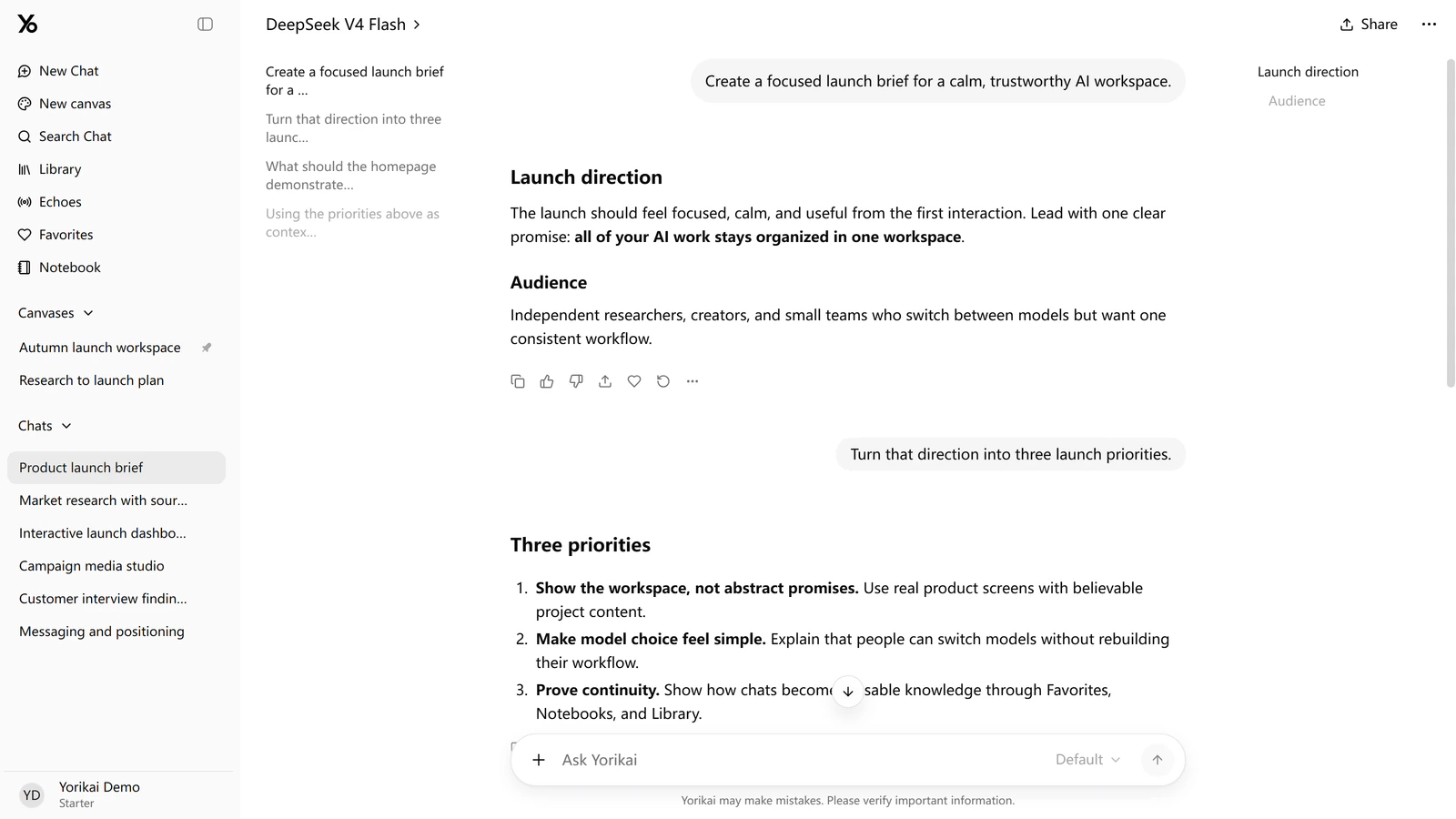
Later, when you return to the project, the updated sidebar gives canvases their own list beside your chat history. You can pin the canvas you're using so it is easier to find on the next visit.
Open a long conversation and the outlines help you get back to a particular question or answer heading. On wide screens they sit beside the messages, leaving room to read. The layout also keeps your place more consistently when you resize the window.
The changelog has the full list of recent changes. You can try them in your next Yorikai chat.