Native Google access is now available in Yorikai
Connect your own Google API key, choose models for chats and Echoes, and benefit from improvements to recovery, image generation, and saving.
Yorikai 1.0.10 adds a native Google connection alongside OpenRouter. You can now use your own Google API key to chat, work with attachments, and generate images with supported Gemini models. Requests go directly to Google through its native API, and Google model usage is billed separately from your Yorikai plan.
To get started, open Settings → Account, choose Google under Provider, and save your key. The guide beside the API Key heading explains how to obtain a key from Google AI Studio and add it to Yorikai. Once connected, choose a supported model for the task you want to complete.
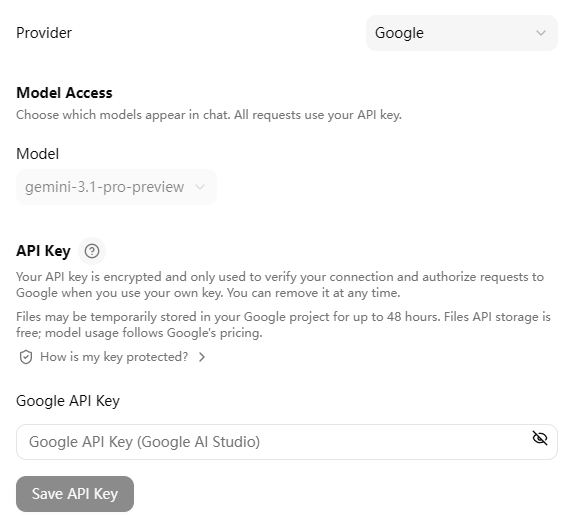
Ordinary chats and Canvas show the models available through your active connection. Switching between Google and OpenRouter refreshes those choices, while each connection keeps its own saved key and model preferences. Available models, attachment support, and generation capabilities depend on the connection and model you select.
Echo configuration now uses a unified model catalog. Filter by function, such as text chat or image generation, and search for a model by name. Select results adds the filtered group to your selection, while Select all adds the current catalog. These selections record the models available in the catalog at that time; new model families are not added automatically.
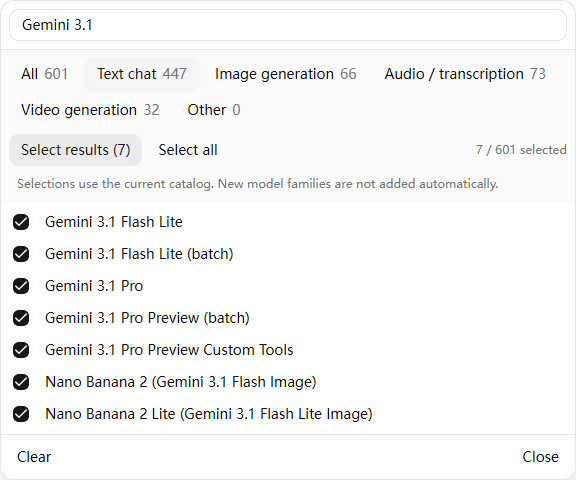
When someone uses an Echo, Yorikai matches its configured models to those available through that person's active connection. This lets an Echo keep one model configuration across supported connections, while the actual choices still depend on the user's own key and model access.
A research Echo, for example, can offer several text models while keeping the same instructions and conversation starters. Each user can choose an available model for the task.
The release also improves recovery after refreshing a conversation or losing a connection. If model access is removed before a pending message can be sent, its unsent text and attachments return to the draft. Image retries preserve the selected size and aspect ratio, and a fix allows affected Google-generated images to download correctly.
Notebook saving now handles retries and version conflicts more reliably, including cases that previously left a save waiting or reported a conflict incorrectly. Login and registration better preserve the intended return page and position, alongside improved password reset and content access checks.
Smaller fixes address false missing-Echo notices when opening sidebar dialogs, unnamed conversation labels in Favorites, and the appearance of plan switches.
Open Yorikai to configure your connection, or read the 1.0.10 changelog for the complete release notes.